基于纯CSS3的6种手绘涂鸦按钮效果
时间:2016-03-15简要教程
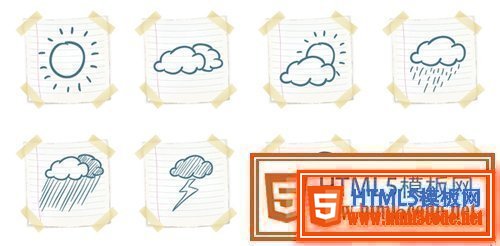
这是一组非常有趣的纯CSS3手绘风格卡通按钮设计效果。这组手绘风格按钮共6种不同的效果,它们以手绘涂鸦的方式,以不同的按钮边框线条宽度和虚线来构成按钮,效果非常不错。
使用方法
HTML结构
该手绘风格卡通按钮的HTML结构就是使用一个按钮<button>元素,配以不同的class类来实现不同的手绘风格按钮。
<section>
  <button class='lined thick'>Lined Thick</button>
  <button class='dotted thick'>Dotted Thick</button>
  <button class='dashed thick'>Dashed Thick</button>
</section>
CSS样式
在这个DEMO中,整个页面以flexbox进行布局。页面字体使用的是一种手绘风格的谷歌字体。
@import url(https://fonts.googleapis.com/css?family=Patrick+Hand+SC);
html, body {
  width: 100%;
  min-height: 100%;
  margin: 0;
  display: -webkit-box;
  display: -webkit-flex;
  display: -ms-flexbox;
  display: flex;
  -webkit-box-orient: vertical;
  -webkit-box-direction: normal;
  -webkit-flex-direction: column;
      -ms-flex-direction: column;
          flex-direction: column;
  -webkit-box-pack: center;
  -webkit-justify-content: center;
      -ms-flex-pack: center;
          justify-content: center;
  background: #F0F0D8;
  font-family: 'Patrick Hand SC', cursive;
}
html section, body section {
  display: -webkit-box;
  display: -webkit-flex;
  display: -ms-flexbox;
  display: flex;
  -webkit-box-orient: horizontal;
  -webkit-box-direction: normal;
  -webkit-flex-direction: row;
      -ms-flex-direction: row;
          flex-direction: row;
  -webkit-box-pack: center;
  -webkit-justify-content: center;
      -ms-flex-pack: center;
          justify-content: center;
  width: 100%;
  min-height: 100%;
  margin-bottom: 3rem;
}
所有的按钮的背景色都设置为透明,通过padding来设置按钮的尺寸,并为按钮设置一些阴影效果和圆角效果。还为按钮指定0.5秒的ease效果的过渡动画。
html section button, body section button {
  -webkit-align-self: center;
      -ms-flex-item-align: center;
          align-self: center;
  background: transparent;
  padding: 1rem 1rem;
  margin: 0 1rem;
  -webkit-transition: all .5s ease;
  transition: all .5s ease;
  color: #41403E;
  font-size: 2rem;
  letter-spacing: 1px;
  outline: none;
  box-shadow: 20px 38px 34px -26px rgba(0, 0, 0, 0.2);
  border-radius: 255px 15px 225px 15px/15px 225px 15px 255px;
}
上面的圆角设置等价于下面的代码:
border-top-left-radius: 255px 15px;
border-top-right-radius: 15px 225px;
border-bottom-right-radius: 225px 15px;
border-bottom-left-radius:15px 255px;
然后分别为6种不同的手绘风格按钮的指定各自的边框样式。
html section button.lined.thick, body section button.lined.thick {
  border: solid 7px #41403E;
}
html section button.dotted.thick, body section button.dotted.thick {
  border: dotted 5px #41403E;
}
html section button.dashed.thick, body section button.dashed.thick {
  border: dashed 5px #41403E;
}
html section button.lined.thin, body section button.lined.thin {
  border: solid 2px #41403E;
}
html section button.dotted.thin, body section button.dotted.thin {
  border: dotted 2px #41403E;
}
html section button.dashed.thin, body section button.dashed.thin {
  border: dashed 2px #41403E;
}
在鼠标滑过按钮时,修改按钮的阴影效果。
html section button:hover, body section button:hover {
  box-shadow: 2px 8px 4px -6px rgba(0, 0, 0, 0.3);
}
最后,使用媒体查询来制作在小屏幕上的布局效果。
@media (max-width: 620px) {
  body h1 {
    margin-top: 2rem;
  }
  body section {
    display: -webkit-box;
    display: -webkit-flex;
    display: -ms-flexbox;
    display: flex;
    -webkit-box-orient: vertical;
    -webkit-box-direction: normal;
    -webkit-flex-direction: column;
        -ms-flex-direction: column;
            flex-direction: column;
    -webkit-box-pack: center;
    -webkit-justify-content: center;
        -ms-flex-pack: center;
            justify-content: center;
    margin-bottom: 1rem;
  }
  body section button {
    -webkit-align-self: center;
        -ms-flex-item-align: center;
            align-self: center;
    margin-bottom: 2rem;
  }
}
来源:http://www.htmleaf.com/css3/ui-design/201602263152.html
相关文章
 如何将 HTML5 性能发挥到极致由于实际运行环境是在浏览器中,因此性能还取决于JavaScript解释器的效率,指定的FPS帧速在低性能解释器中可能不会
 HTML5 VideoAPI,打造自己的Web视频播放器本文将使用HTML5提供的VideoAPI做一个自定义的视频播放器,需要用到HTML5提供的video标签、以及HTML5提供的对JavascriptAP
 HTML5 手势检测原理和实现随着 Hybrid 应用的丰富,HTML5 工程师们已经不满足于把桌面端体验简单移植到移动端,他们觊觎移动原生应用人性化的
- 4分钟学会网页样式[译]你想要在自己网站上分享一个产品,或者是一个作品集,又或者仅仅只是一个灵感。在你发布到网上之前,你想让它
 H5你真的了解吗?(绝对干货)H5广告,包括H5广告的设计流程,究竟有什么讲究,和阶段。为了能帮助更多的人了解H5广告,我专门做了一个讲义。
 2015-2016前端架构体系技术精简版本文主要内容有:框架与组件、构建生态、开发技巧与调试、html、css与重构、native/hybrid/桌面开发、前端/H5优化、全
 有关HTML5页面在iPhoneX适配问题这篇文章主要介绍了有关HTML5页面在iPhoneX适配问题,需要的朋友可以参考下
 html5中canvas图表实现柱状图的示例本篇文章主要介绍了html5中canvas图表实现柱状图的示例,本文使用canvas来实现一个图表,小编觉得挺不错的,现在分享给大家