div+css样式自制带小三角的tooltips效果
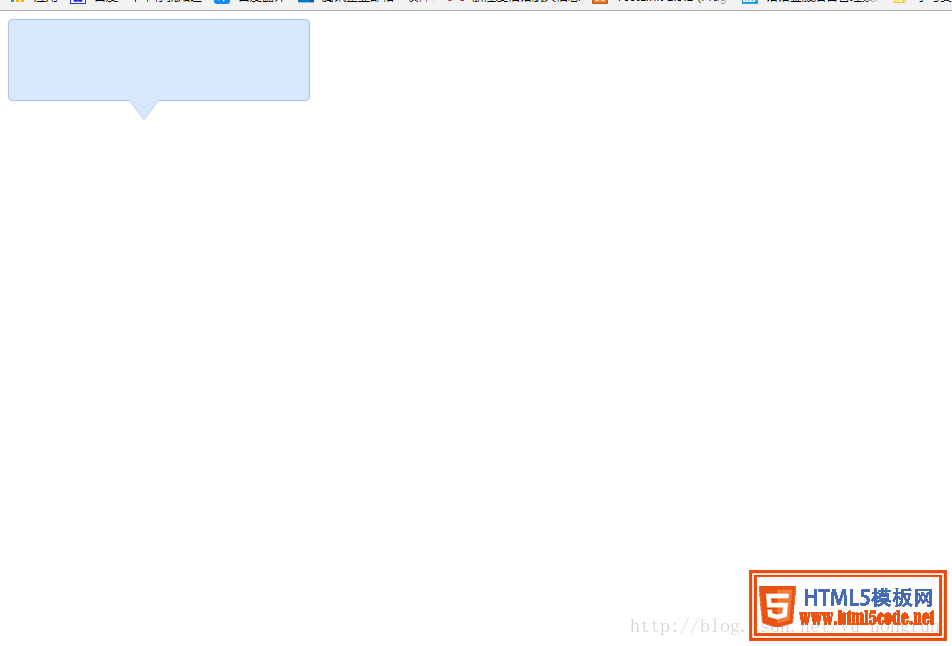
时间:2017-10-20代码和效果图如下:
<!DOCTYPE html>
<html>
    <head>
        <meta charset="utf-8" />
        <title></title>
        <style type="text/css">
            .tooltips {
                position: relative;
                width: 300px;
                height: 80px;
                line-height: 60px;
                background: #D7E7FC;
                border-radius: 4px;
            }
            .arrow {
                position: absolute;
                color: #D7E7FC;
                width: 0px;
                height: 0px;
                line-height: 0px;
                border-width: 20px 15px 0;
                border-style: solid dashed dashed dashed;
                border-left-color: transparent;
                border-right-color: transparent;
                bottom: -20px;
                right: 50%;
            }
            .tooltips {
                position: relative;
                width: 300px;
                height: 80px;
                line-height: 60px;
                background: #D7E7FC;
                border: 1px solid #A5C4EC;
                border-radius: 4px;
            }
            .arrow {
                position: absolute;
                width: 0px;
                height: 0px;
                line-height: 0px;
                border-width: 20px 15px 0;
                border-style: solid dashed dashed dashed;
                border-left-color: transparent;
                border-right-color: transparent;
            }
            .arrow-border {
                color: #A5C4EC;
                bottom: -20px;
                right: 50%;
            }
            .arrow-bg {
                color: #D7E7FC;
                bottom: -19px;
                right: 50%;
            }
        </style>
    </head>
    <body>
        <!--先定义一个相对定位的盒子div:-->
        <div class="tooltips">
            <!--给div盒子添加一个三角型图标-->
            <div class="arrow "></div>
            <!--给“小三角穿上松紧带”需要使用两个三角形叠加的方式-->
            <!--首先我们定义两个三角形的div,一个背景色和盒子的边框颜色相同,一个背景色和盒子的背景色一致:-->
            <div class="arrow arrow-border"></div>
            <div class="arrow arrow-bg"></div>
            <!--注意:.arrow-bg和.arrow-border的bottom位置相差为1px(可根据边框宽度调整)两个div的顺序不可颠倒。-->
        </div>
    </body>
</html>
效果展示图
总结
以上所述是小编给大家介绍的 div+css样式自制带小三角的tooltips效果,希望对大家有所帮助,如果大家有任何疑问请给我留言,小编会及时回复大家的。在此也非常感谢大家对网站的支持!
相关文章
 用CSS样式生成搜索、购物车等图标样式(图标字体库)这篇文章主要介绍了用CSS样式生成搜索、购物车等图标样式(图标字体库)的相关资料,需要的朋友可以参考下
- HTML中div和span比较_动力节点Java学院整理这篇文章主要介绍了HTML中div和span比较,分别介绍了div和span的用法和比较,有兴趣的可以了解一下
- CSS样式继承和层叠这篇文章主要介绍了CSS样式继承和层叠的相关资料,需要的朋友可以参考下
 HTML (css样式规范)必看篇下面小编就为大家带来一篇HTML (css样式规范)必看篇。小编觉得挺不错的,现在就分享给大家,也给大家做个参考。一
 HTML基础必看——全面了解css样式表下面小编就为大家带来一篇HTML基础必看——全面了解css样式表。小编觉得挺不错的,现在就分享给大家,也给大家做
 HTML基础知识——css样式表,样式属性,格式与布局详解下面小编就为大家带来一篇HTML基础知识——css样式表,样式属性,格式与布局详解。小编觉得挺不错的,现在就分享给
 纯css实现照片墙3D效果的示例代码这篇文章主要介绍了纯css实现照片墙3D效果的示例代码,可以实现鼠标经过图片实现改变,具有一定的参考价值,感兴趣的小
 纯 Css 绘制扇形的方法示例本篇文章主要介绍了纯 Css 绘制扇形的方法示例,小编觉得挺不错的,现在分享给大家,也给大家做个参考。一起跟随小编过