css选择器_动力节点Java学院整理
时间:2017-08-15在HTML页面的<head></head>节点里,添加<style type="text/css" ></style> 脚本。
<head>
    <title>page标题</title>
    <style type="text/css">
        input{background-color:Green }
    </style>
</head>
使用场景
单个page特有的样式。
内联样式
存放方式
元素的Style属性里。
<input type="text" style="background-color:Blue;" value="input1"/>
样式的优先级
当一个元素附加许多级样式时,比如:外联样式包含此元素、内联样式也包含此元素等,样式采用的是并集方式。
若有交集的元素,将按以下的情况决定采用哪个样式属性:
非同级引用
外部样式表、内部样式表、内联样式都设置了此元素的某个相同样式属性。
优先级对比
内联样式 > 内部样式表 > 外部样式表
对相同的样式属性,其值是获取优先级最高的。
示例
<head>
    <style>
        #testinput{width:300px}
    </style>
</head>
<body  >
<input type="text" id="testinput" style="background-color:Blue;width:120px;" value="input1"/>
</body>
input标签的width属性,实际为120px;
同级引用
在外部样式表 或 内部样式表里 多个样式选择器包含了此元素。
优先级对比
外部样式表、内部样式表 情况下:Id选择器 > class 类选择器 >元素选择器。
内联样式情况下:采用后面同属性样式的值。
示例
<head>
    <style>
        input{background-color:Yellow;}
        #testinput{background-color:Red;}
        .showblue{background-color:Blue;}
    </style>
</head>
<body  >
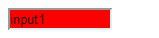
<input type="text" id="testinput" class="showblue" value="input1" style="width:1000px;width:100px"/>
</body>
显示图片:
 CSS 学习笔记之CSS Selector这篇文章主要介绍了CSS 学习笔记之CSS Selector的相关资料,需要的朋友可以参考下
 纯css实现照片墙3D效果的示例代码这篇文章主要介绍了纯css实现照片墙3D效果的示例代码,可以实现鼠标经过图片实现改变,具有一定的参考价值,感兴趣的小
 纯 Css 绘制扇形的方法示例本篇文章主要介绍了纯 Css 绘制扇形的方法示例,小编觉得挺不错的,现在分享给大家,也给大家做个参考。一起跟随小编过