C#使用checkedListBox1控件链接数据库的方法示例
时间:2022-11-26本文实例讲述了C#使用checkedListBox1控件链接数据库的方法。分享给大家供大家参考,具体如下:
在数据库中创建三个表: 学生信息表 爱好表 学生爱好表
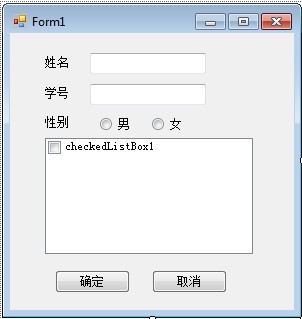
结果让学生的信息和爱好同时显示到C#窗体上面
using System;
using System.Collections;
using System.Collections.Generic;
using System.Data;
using System.Diagnostics;
using System.Data.Sql;
using System.Data.SqlClient;
namespace WindowsFormsApplication1
{
  class DataDase
  {
    public string Con = "";
    public DataTable DATA_SQL(string SQL)
    {
      SqlConnection myconn = new SqlConnection(Con);
      //Con为数据库连接字段
      SqlDataAdapter myadapter = new SqlDataAdapter(SQL, myconn);
      DataSet mydataset = new DataSet();
      myadapter.Fill(mydataset);
      return mydataset.Tables[0];
    }
    public void RUN_SQL(string SQL)
    {
      SqlConnection myconn = new SqlConnection(Con);
      SqlDataAdapter myadapter = new SqlDataAdapter(SQL, myconn);
      DataSet mydataset = new DataSet();
      myadapter.Fill(mydataset);
    }
  }
}
using System;
using System.Collections.Generic;
using System.ComponentModel;
using System.Data;
using System.Drawing;
using System.Linq;
using System.Text;
using System.Windows.Forms;
using System.IO;
namespace WindowsFormsApplication1
{
  public partial class Form1 : Form
  {
    public Form1()
    {
      InitializeComponent();
    }
    private void Form1_Load(object sender, EventArgs e)
    {
    }
    private void button1_Click(object sender, EventArgs e)
    {
      checkedListBox1.Items.Clear();
      DataDase database = new DataDase();
      database.Con = @"Data Source = 192.168.1.3; Initial Catalog = zxl; User Id = sa; Password = zxl; ";
      DataTable dt,t;
      t = database.DATA_SQL("select * from 学生信息表 where c#='" + textBox1.Text + "'");
      textBox2.Text= t.Rows[0][1].ToString();
      if (t.Rows[0][3].ToString().Equals("1"))
      {
        radioButton1.Checked=true;
      }
      else {
        radioButton2.Checked = true;
      }
      dt = database.DATA_SQL("SELECT 爱好表.love FROM 学生信息表 INNER JOIN 学生爱好表 ON 学生信息表.c# = 学生爱好表.c# INNER JOIN 爱好表 ON 学生爱好表.s# = 爱好表.s# WHERE (学生信息表.c# = '"+textBox1.Text+"')");
      for (int i = 0; i < dt.Rows.Count; i++)
      {
        checkedListBox1.Items.Add(dt.Rows[i][0]);
      }
    }
  }
}
create database zxl
use zxl
----------------------------------------------
create table 学生信息表(
c# char(5) primary key,
num char(11) not null,
name char(6) not null,
sex int
)
create table 爱好表(
s# char(5) primary key,
love char(4) not null
)
create table 学生爱好表(
s# char(5) references 爱好表(s#),
c# char(5) references 学生信息表(c#),
code char(10) not null,
primary key(s#,c#)
)
----------------------------------------------
insert into 学生信息表 values('1','111111','zhang',1)
insert into 学生信息表 values('2','222222','wang',0)
insert into 学生信息表 values('3','333333','li',1)
----------------------------------------------
insert into 爱好表 values('11','学习')
insert into 爱好表 values('22','篮球')
insert into 爱好表 values('33','时尚')
insert into 爱好表 values('44','游戏')
insert into 爱好表 values('55','购物')
insert into 爱好表 values('66','其他')
----------------------------------------------
insert into 学生爱好表 values('11','1','code')
insert into 学生爱好表 values('22','1','code')
insert into 学生爱好表 values('33','1','code')
insert into 学生爱好表 values('44','1','code')
insert into 学生爱好表 values('55','1','code')
insert into 学生爱好表 values('66','1','code')
insert into 学生爱好表 values('11','2','code')
insert into 学生爱好表 values('33','2','code')
insert into 学生爱好表 values('11','3','code')
insert into 学生爱好表 values('44','3','code')
----------------------------------------------
select love
from 学生信息表,爱好表,学生爱好表
where 学生爱好表.c# = 学生信息表.c# and 学生爱好表.s# = 爱好表.s# and 学生信息表.c#='3'
更多关于C#相关内容感兴趣的读者可查看本站专题:《C#常见控件用法教程》、《C#窗体操作技巧汇总》、《C#数据结构与算法教程》、《C#面向对象程序设计入门教程》及《C#程序设计之线程使用技巧总结》
希望本文所述对大家C#程序设计有所帮助。
相关文章
 C# SendMail发送邮件功能实现这篇文章主要为大家详细介绍了C# SendMail发送邮件功能实现,具有一定的参考价值,感兴趣的小伙伴们可以参考一下
- C#实现的SQL备份与还原功能示例这篇文章主要介绍了C#实现的SQL备份与还原功能,结合具体实例形式分析了C#操作数据库实现SQL备份与还原相关的控件、
- C#实现的sqlserver操作类实例这篇文章主要介绍了C#实现的sqlserver操作类,结合具体实例形式分析了C#针对sqlserver数据库进行连接、查询、更新、关闭
- C#多线程数组模拟socket这篇文章主要为大家详细介绍了C#多线程数组模拟socket的相关代码,具有一定的参考价值,感兴趣的小伙伴们可以参考
- C#根据http和ftp图片地址获取对应图片这篇文章主要为大家详细介绍了C#根据http和ftp图片地址获取对应图片,具有一定的参考价值,感兴趣的小伙伴们可以
 C#微信开发之发送模板消息这篇文章主要为大家详细介绍了C#微信开发之发送模板消息的相关资料,具有一定的参考价值,感兴趣的小伙伴们可以