HTML5、Select下拉框右边加图标的实现代码(增进用户体验)
时间:2017-10-20本文给大家讲h5、select下拉框右边加图标,深度美化页面增进用户体验效果
1.那么我们先来看一下效果吧!

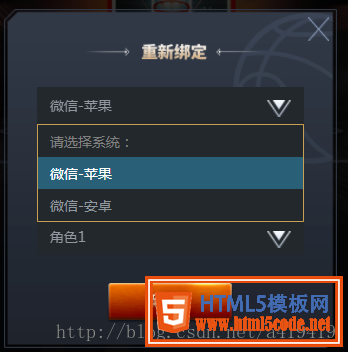
2.再看看h5的结构:
<div id="login-div">
                <div class="select-wrapper">
                    <select id="selector1">
                        <option value="" disabled selected>请选择系统:</option>
                        <option value="1">微信-苹果</option>
                        <option value="2">微信-安卓</option>
                    </select>
                    <img src="ossweb-img/arrow.png" alt="" class="arrow" />
                </div>
                <div class="select-wrapper">
                    <select id="selector2">
                        <option value="" disabled selected>请选择渠道:</option>
                        <option value="1">渠道1</option>
                        <option value="2">渠道2</option>
                    </select>
                    <img src="ossweb-img/arrow.png" alt="" class="arrow" />
                </div>
                <div class="select-wrapper">
                    <select id="selector3">
                        <option value="" disabled selected>请选择大区:</option>
                        <option value="1">大区1</option>
                        <option value="2">大区2</option>
                    </select>
                    <img src="ossweb-img/arrow.png" alt="" class="arrow" />
                </div>
                <div class="select-wrapper">
                    <select id="selector4">
                        <option value="" disabled selected>请选择角色:</option>
                        <option value="1">角色1</option>
                        <option value="2">角色2</option>
                    </select>
                    <img src="ossweb-img/arrow.png" alt="" class="arrow" />
                </div>
                <p id="notice">单个帐号只能领取一次奖励</p>
                <img src="ossweb-img/comfire1.png" alt="" id="comfire1"/>
            </div>
3.样式部分是用了sass进行控制的,如果不会sass也可以换成css。没有什么特别的运算需要转化,所以换成css也简单
@function REM($n){
        @return $n/$REM*1rem;
    }
 #login-div{
        background: url(../ossweb-img/kuang1.png)0 0 no-repeat;
        background-size: 100% 100%;
        width: REM(564);
        height: REM(531);
        margin-left: REM(38);
        .select-wrapper{
            position: relative;
            display: flex;
            justify-content: center;
            align-items: center;
            height: REM(50);
            margin: REM(10) auto;
            padding-top: REM(15);
            &>select{
                width: REM(458);
                height: REM(63);
                padding-left: REM(20);
                border: 1px solid #23282d;
                background: #23282d;
                -webkit-appearance: none;
                color: #92989f;
                font-size: REM(24);
                margin-top: REM(75);
                border-radius: 0;
                z-index:10;
            }
            .arrow{
                position: absolute;
                width: REM(41);
                height: REM(30);
                top: REM(65);
                right: REM(80);
                pointer-events: none;
                z-index:11;
            }
        }
        #notice{
                font-size: REM(20);
                color: #92989f;
                text-align: center;
                margin-top: REM(75);
        }
        #comfire1{
                width: REM(220);
                height: REM(78);
                margin-top: REM(20);
                margin-left: REM(174);
        }
    }
4.解析:主要是.arrow这个元素进行右边那个图标的位置控制。利用position: absolute;这个属性控制好位置,就基本没有问题了。
总结
相关文章
 关于h5中的fetch方法解读(小结)这篇文章主要介绍了关于h5中的fetch方法解读(小结),fetch身为H5中的一个新对象,他的诞生,是为了取代ajax的存在而出
 HTML5打开手机扫码功能及优缺点这篇文章主要介绍了HTML5打开手机扫码功能及优缺点的相关资料,需要的朋友可以参考下
 html5唤起app的方法这篇文章主要介绍了html5唤起app的方法的相关资料,小编觉得挺不错的,现在分享给大家,也给大家做个参考。一起跟
- HTML5添加禁止缩放功能本文通过一段代码给大家介绍了HTML5添加禁止缩放功能,代码简单易懂,非常不错,具有参考借鉴价值,需要的朋友参
- 有关HTML5中背景音乐的自动播放功能这篇文章主要介绍了有关HTML5中背景音乐的自动播放功能的相关资料,需要的朋友可以参考下
 浅谈html5之sse服务器发送事件EventSource介绍本篇文章主要介绍了浅谈html5之sse服务器发送事件EventSource介绍,具有一定的参考价值,有兴趣的可以了解一下
 有关HTML5页面在iPhoneX适配问题这篇文章主要介绍了有关HTML5页面在iPhoneX适配问题,需要的朋友可以参考下
 html5中canvas图表实现柱状图的示例本篇文章主要介绍了html5中canvas图表实现柱状图的示例,本文使用canvas来实现一个图表,小编觉得挺不错的,现在分享给大家